For contractors and fleet managers, cash flow is oxygen. The Lowe’s PreLoad Discover Card occupies a unique space in the construction financial toolkit. It is not a credit line; it is a high-limit, prepaid expense management vehicle designed to bypass the friction of traditional credit checks while retaining the coveted 5% Pro discount.
After getting the discount, make sure to enter the customer satisfaction Sweepstakes at lowes.com/survey once you’ve validated the receipt and eligibility.
Sign Up and Start Enjoying Discover Card Benefits in 3 Steps
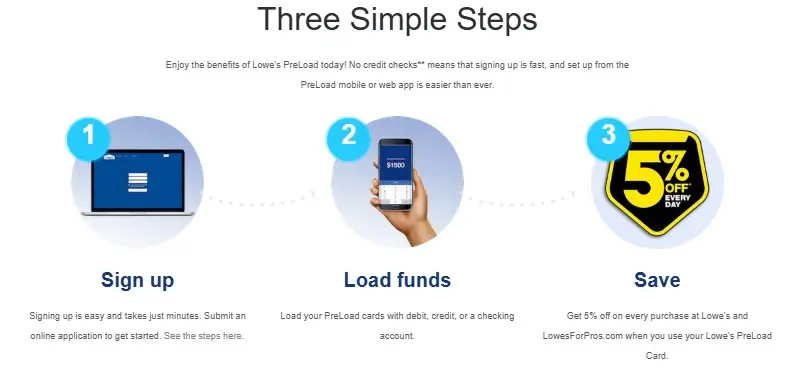
Step1: Sign up now at app.lowespreload.com/signup. It takes just minutes. You have to submit an application online and start after it is approved.
Step 2: Load your PreLoad card with debit, credit, or a checking account.
Step 3: Get 5% off every purchase at Lowe’s and Lowe’s for Pros when you use the card.
Most articles gloss over the technical specifications of this card. This guide dissects the funding mechanics, hidden limits, and integration protocols necessary to make this tool work for your bottom line.
The Core Mechanism: How the 5% Rebate Actually Works
Unlike standard rewards cards that offer “points” or “miles,” the Lowe’s Pre-Load Discover Card offers a direct operational discount. However, the timing of this benefit is critical for cash flow forecasting.
The 5% is not a point-of-sale deduction. You will pay the full shelf price at the register rebate accumulates as a Statement Credit.
The Math:
- Calculation: 5% of the net settled transactions (purchases minus returns) in a calendar month.
- Payout Date: The credit is posted to your account on the 15th of the following month.
- Example: If you spend $10,000 in May, your account is credited $500 on June 15th.
Warning: If your returns exceed your purchases in a calendar month, resulting in a negative net transaction balance, you forfeit the 5% credit for that month.
Hard Limits and Funding Specifications
The “Pre-Load” nature of the card means you are your own bank. Understanding the vault and card limits is essential to prevent decline codes at the register.
Vault vs. Card Limits
The system distinguishes between your master “Company Vault” (the central pot of money) and individual employee cards.
| Aggregate Account Limit | $250,000 | Total funds held across the Vault and all active cards combined. |
| Card Load Limit | $50,000 | The maximum balance allowed on a single employee card at any one time. |
| Daily Spend Limit | Available Balance | No artificial daily cap; you can spend up to the loaded amount. |
Funding Velocity
Cash flow often stalls when funds are stuck in transfer. The Lowe’s Pre-Load system offers three funding speeds:
- Credit/Debit Card Load: Immediate availability. This is the fastest way to fund a purchase while standing in the parking lot.
- Bank Transfer (ACH): Typically 3-4 business days. Best for scheduled monthly operational capital.
- Direct Deposit: Variable, depends on the payer.
Fee Structure: The Hidden Costs
While the card touts “No Annual Fee,” specialized service fees can erode your margins if you aren’t careful. These are the confirmed operational fees as of late 2025/early 2026 documentation:
- Expedited Card Shipping: $35.00. If you lose a card and need a replacement in 2 days, you pay a premium.
- Paper Statements: $10.99 per month per vault/cardholder. Fix: Ensure “E-Communications” is enabled immediately upon setup to avoid this recurring bleed.
- Paper Check Issuance: $39.99. If you close your account and request a physical check for the remaining balance, they charge a steep processing fee. Strategy: Spend the balance down to zero or transfer it electronically to your bank (free) before closing the account.
- Foreign Transaction Fee: 3%. This card is optimized for U.S. Lowe’s locations. Avoid using it for international material orders.
Troubleshooting: Decline Codes and Login Fixes
Nothing stops a job site faster than a declined card. If your runner calls you from the checkout line, use this diagnostic guide.
Common Decline Codes
- Code 05 (Do Not Honor): The bank has flagged the transaction. This often happens when a card is used outside its usual radius or for an unusually large amount. Fix: Administrator must call 1-855-515-5214 to clear the flag.
- Code 51 (Insufficient Funds): The specific card is empty, even if the Vault has money. Fix: The Admin must log in to the app and transfer funds from the Vault to that specific card. This transfer is instant.
- Code 65 (Activity Limit Exceeded): You have hit the $50,000 card limit or the $250,000 account limit.
The “Authfailure” Login Loop
Recent user reports indicate a persistent login issue on the desktop portal: the page either loops or displays an error. The Insider Fix: If you see “authfailure” in the URL bar, delete the specific text “authfailure” from the address and hit Enter. This often redirects you to the identity verification page, bypassing the glitch and allowing access to your dashboard.
Integration: Bookkeeping for the Modern Contractor
The primary value of the Lowe’s Pre-Load Discover Card over a standard credit card is the expense categorization capability. The card integrates with the “Lowe’s PreLoad” app (distinct from the consumer Lowe’s app).
Export Capabilities:
- QuickBooks: The system supports a native QuickBooks CSV export. This is not a live bank feed (Plaid-style) but a formatted file download.
- Excel: Standard CSV export for custom pivot tables.
Workflow Recommendation: Require employees to snap a photo of the receipt and categorize the job code in the app immediately after purchase. The app allows real-time tagging. At the end of the week, the Admin exports the CSV file, which already contains the job codes, saving hours of manual data entry in QuickBooks.
Verdict: Choose the Pre-Load Discover Card if you have limited credit history, want to strictly control employee spending limits (preventing overspending), or prefer using cash-on-hand while still capturing the 5% material discount.
- A Contractor’s Guide to Building Trust with Customer Feedback
- From Complaint to Case Study: How to Turn Negative Feedback into a Marketing Win
- How to Build Your First DIY Tool Kit from Lowe’s for Under $150
- The Ultimate Guide to Lowe’s Black Friday & Cyber Monday Tool Deals
- An Honest Review of FLEX Power Tools at Lowe’s: The New Contender